
SelfReason telegram bot: AI in your chat
Tip
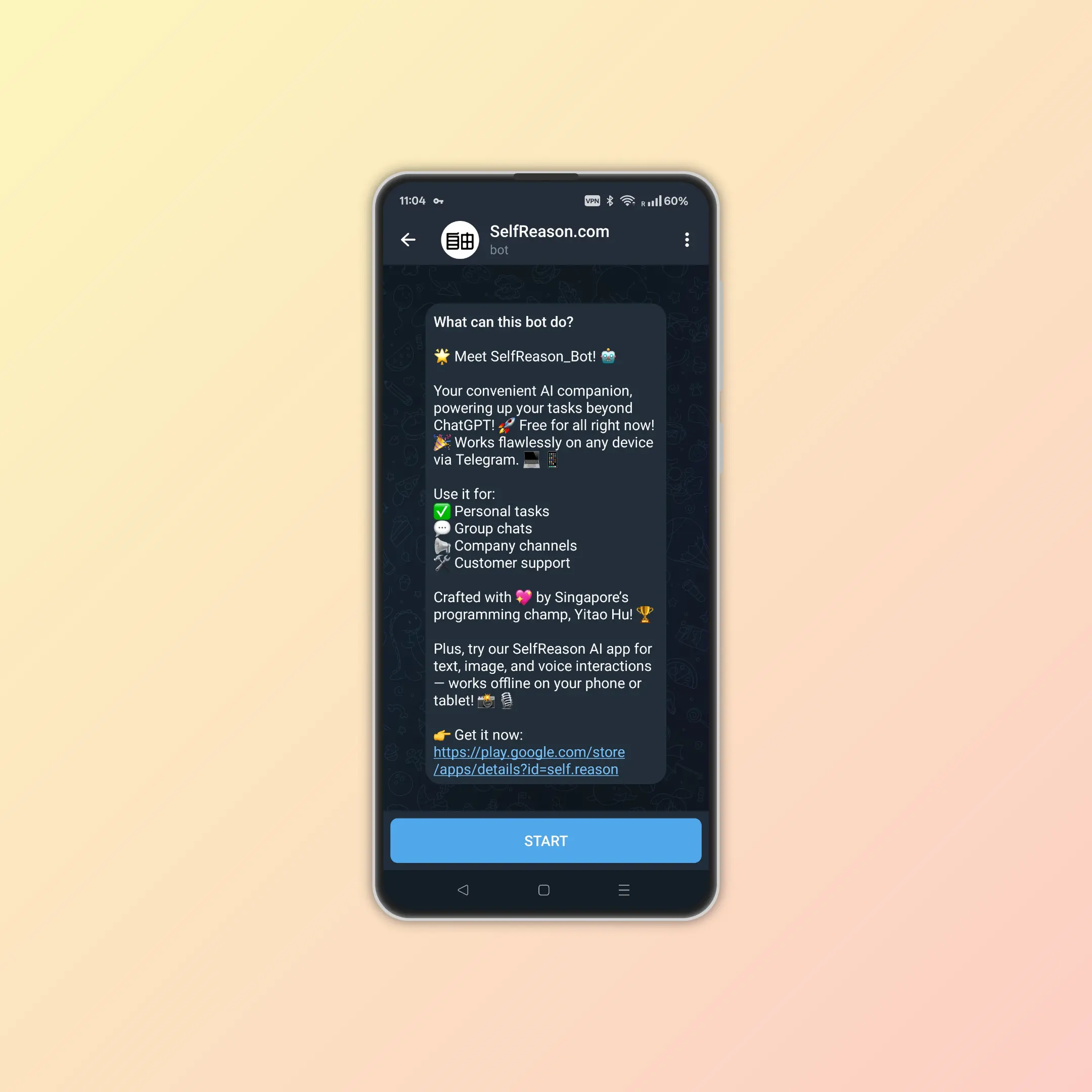
Access SelfReason directly from your browser or any device via Telegram! No installation needed—just chat and get things done instantly. 🚀
Try SelfReason Telegram Bot for free at 👉 https://t.me/SelfReason_Bot
SelfReason's Telegram bot brings powerful AI capabilities directly to your favorite messaging platform. Whether you're working alone, chatting with friends, or managing business communications, SelfReason integrates seamlessly into your workflow.
Features
🤖 Instant AI access
- 💬 Natural Conversations: Chat with AI just like you would with any contact
- ⚡ Real-time Responses: Get immediate answers without switching apps
- 🌍 Universal Access: Works on any device with Telegram - phone, tablet, desktop, or web
- 🔄 Seamless Integration: Use AI without interrupting your existing chat flow
🎯 Multi-Modal capabilities
- 📝 Text Processing: Handle complex text analysis, writing, and editing tasks
- 📊 Data Analysis: Process and interpret various types of information
- 🔍 Research Assistance: Get help with research, fact-checking, and information gathering
- 💡 Creative Support: Brainstorming, ideation, and creative problem-solving
🛡️ Privacy & security
- 🔒 Secure Communication: All interactions are processed securely
- 👥 Group-Friendly: Safe to use in group chats and business channels
- 📱 No Installation: No need to download additional apps or share personal device access
Use cases
✅ Personal tasks
- 📝 Writing Assistance: Draft emails, messages, and documents
- 🧮 Quick Calculations: Solve math problems and data analysis
- 📚 Learning Support: Get explanations and educational help
- 🗓️ Planning: Organize schedules and create to-do lists
💬 Group chats
- 🎯 Shared Research: Collaborate on finding information
- 🎨 Creative Projects: Brainstorm ideas with friends
- 🔧 Problem Solving: Get help with technical questions
- 📖 Fact-Checking: Verify information in real-time discussions
📢 Company channels
- 📊 Data Queries: Quick access to analysis and insights
- 📝 Content Creation: Draft announcements and communications
- 🔍 Research Support: Gather market intelligence and competitive analysis
- ⚡ Workflow Enhancement: Streamline information processing tasks
🛠 Business customer support
- 👥 24/7 Availability: Provide round-the-clock assistance
- 📱 Multi-Platform Support: Reach customers on their preferred platform
- 🎯 Consistent Responses: Maintain quality across all interactions
- 📈 Scalable Solution: Handle multiple conversations simultaneously
Getting started
1. Access the bot
Simply click this link or search for @SelfReason_Bot in Telegram:
2. Start chatting
- Send any message to begin
- Ask questions in natural language
- Share images, documents, or links for analysis
- Use commands for specific functions
3. Integration tips
- Group Usage: Add the bot to group chats for collaborative AI assistance
- Business Integration: Use in business channels for customer support
- Personal Workflow: Bookmark for quick daily tasks and questions
Advanced features
🔄 Multi-Service coordination
- 🧠 Smart Routing: Automatically selects the best AI service for your request
- ⚡ Parallel Processing: Handles complex queries by coordinating multiple AI services
- 🎯 Optimized Results: Combines different AI strengths for superior outcomes
🌐 Cross-Platform synergy
- 🔗 HuBrowser Integration: Seamlessly works with other HuBrowser ecosystem tools
- 📱 Device Continuity: Start conversations on one device, continue on another
- ☁️ Cloud Coordination: Balances local and cloud AI for optimal performance
🛠️ Business applications
- 📈 Analytics Integration: Connect with business data sources
- 🤝 Team Collaboration: Enhance team productivity with AI assistance
- 📋 Workflow Automation: Streamline repetitive tasks and processes
- 📊 Reporting: Generate insights and summaries from conversations
Best practices
💬 Effective communication
- 🎯 Be Specific: Clear questions get better answers
- 📝 Provide Context: Include relevant background information
- 🔄 Iterate: Refine questions based on initial responses
- 📊 Use Examples: Show what you're looking for with examples
🔒 Privacy considerations
- 👥 Group Settings: Be mindful of sensitive information in group chats
- 💼 Business Use: Follow company policies for AI tool usage
- 📱 Personal Data: Avoid sharing sensitive personal information
- 🛡️ Security: Use official channels and verify bot authenticity
⚡ Performance tips
- 📱 Network: Ensure stable internet connection for best performance
- 🎯 Focus: Break complex tasks into smaller, focused questions
- ⏰ Timing: Allow time for complex processing tasks
- 🔄 Retry: Try rephrasing if initial results aren't optimal
Support & contact
For technical support, feature requests, or general questions about the Telegram bot:
- 🐦 X.com: Tag us at https://x.com/HuBrowser
- 📧 Email: Contact us at [email protected]
- 🌐 Social Media: Find us on other platforms
Related
- 📱 Android App: Full-featured offline AI experience
- 🌐 Web App: Browser-based AI access
- 🏠 SelfReason Overview: Learn about all SelfReason platforms